ProCamera v27.0 is here, bringing support for the new variable aperture on iPhone 18 Pro and 18 Pro Max
After our first week with the brand new iPhones, we explore what the new camera hardware and the f-stop dial mean in practice and how mobile photographers can put it to use.
Familiar Lenses, New Creative Possibilities
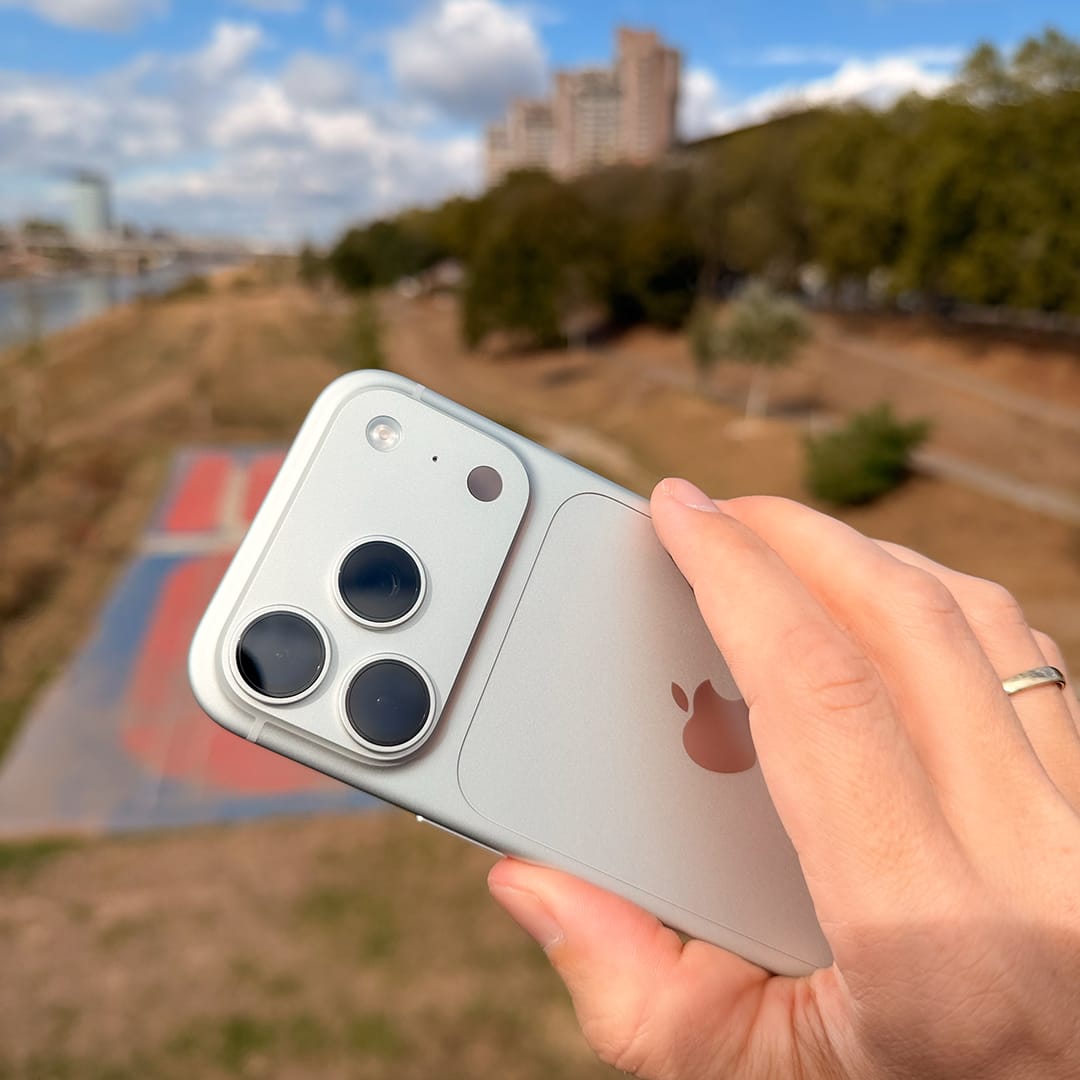
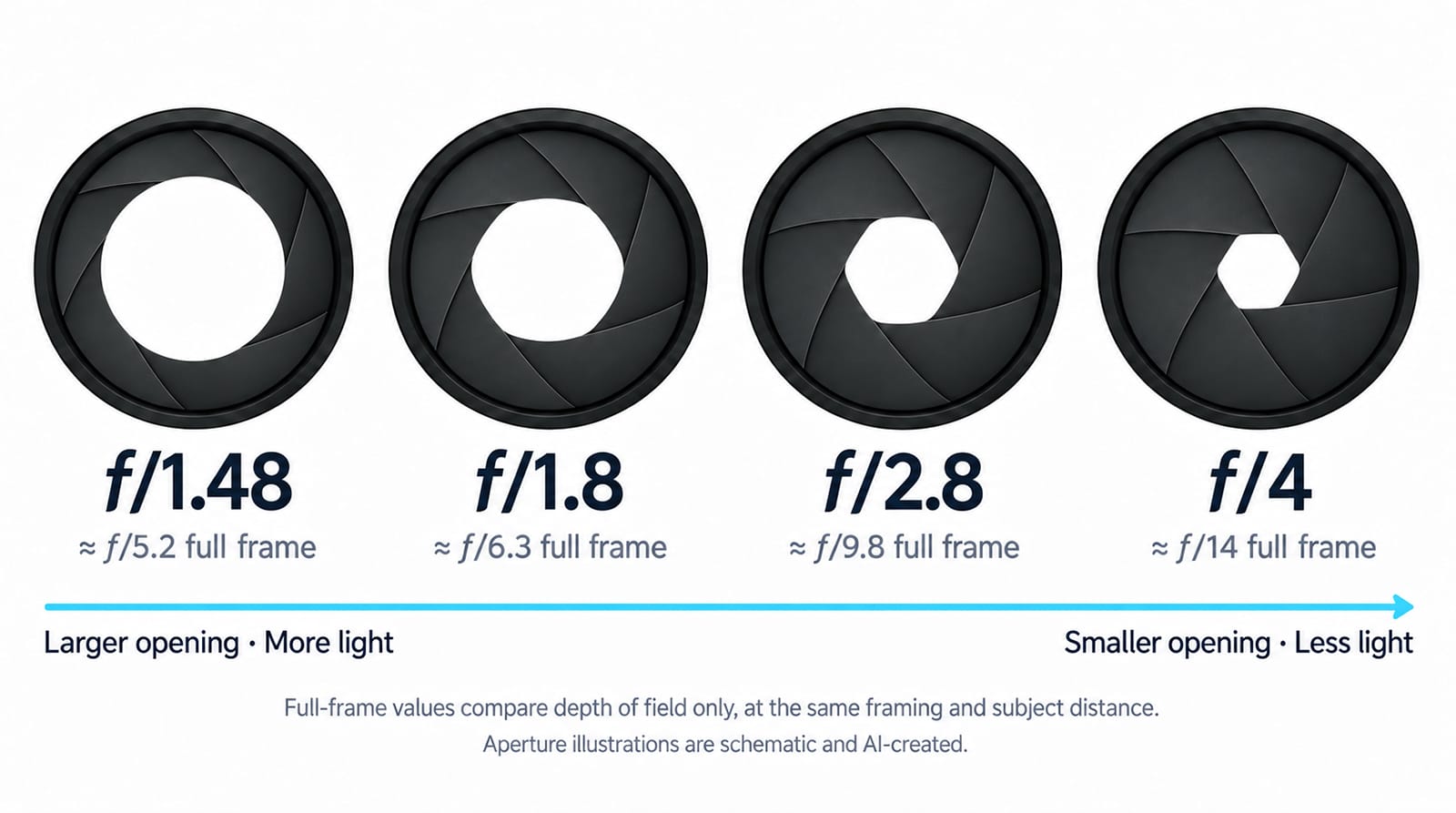
The biggest camera hardware change on the iPhone 18 Pro and Pro Max is in the 48MP main camera: a physical variable aperture ranging from ƒ/1.48 to ƒ/4 replaces the fixed ƒ/1.78 aperture of the iPhone 17 Pro generation. It opens wider to gather more light and can stop down to increase depth of field, giving photographers more control over the final image. The 48MP ultra-wide at ƒ/2.2 and the 48MP 4× telephoto at ƒ/2.8 retain their familiar hardware specifications. For ProCamera users, the main camera is therefore where this year’s most interesting hands-on change begins: aperture becomes another setting you can use to shape your photograph.
Variable Aperture on the iPhone 18 Pro: What to Expect
The biggest practical benefit of the variable aperture is control over light. A wider aperture lets in more light, allowing a shorter exposure time or a lower ISO. Stopping down reduces that light, giving you room to use longer exposures when conditions allow. For video, this can help achieve natural motion blur, although it won’t replace an ND filter in bright daylight.
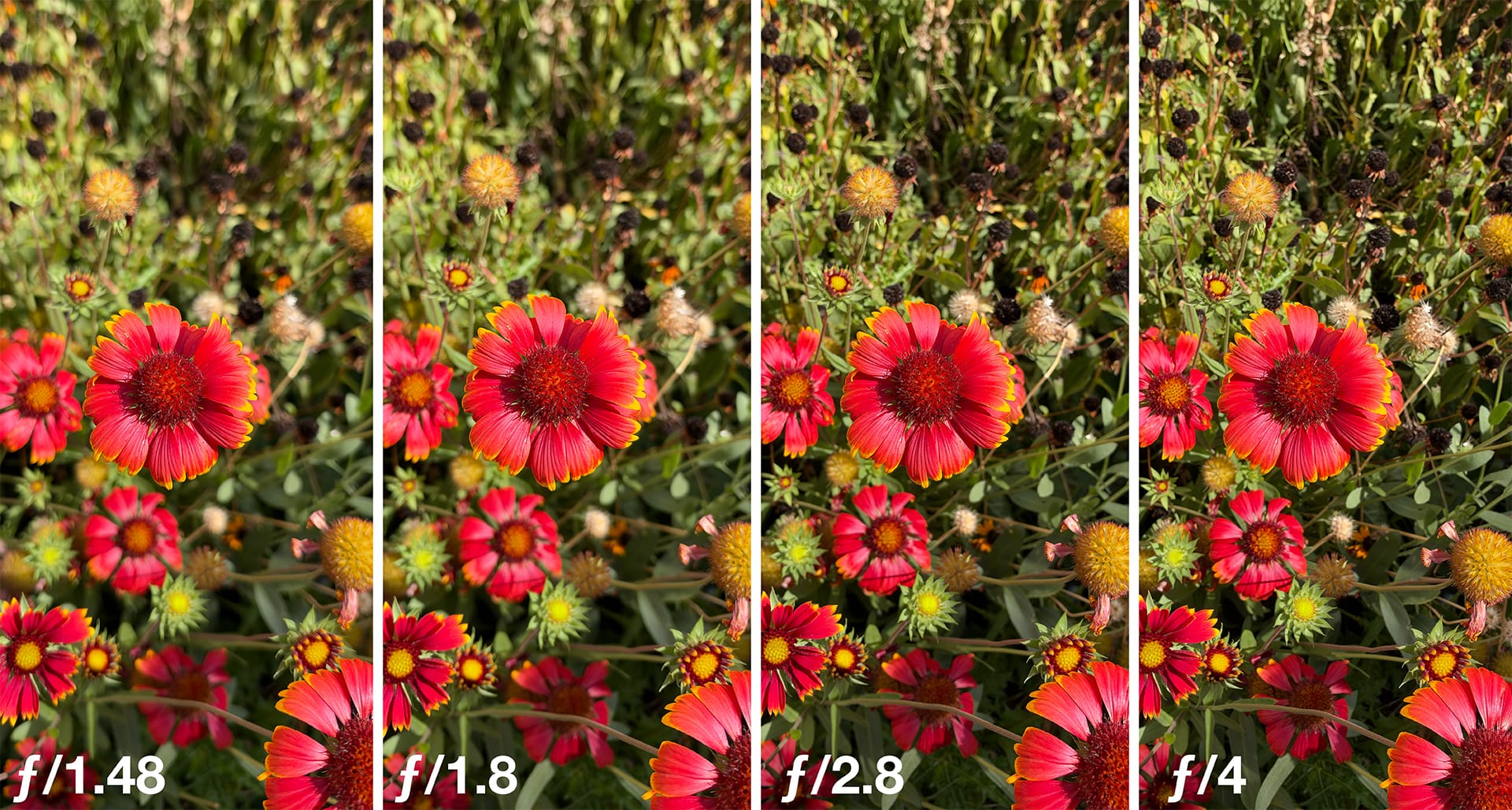
Depth of field changes, but subtly. Variable aperture gives you a new way to influence how much of your scene stays in focus. The iPhone’s sensor is much smaller than those in big DSLR and mirrorless cameras. Together with its short actual focal length, this means much of a scene stays in focus (deep depth of field). Adjusting the aperture gives you more control over depth of field, but the effect is a lot subtler than on a larger camera and most noticeable with close-up subjects. For full-body portraits, opening up to ƒ/1.48 won’t produce pronounced optical background blur.
Background blur becomes more noticeable up close. Move closer to your subject and keep the background farther away, and the difference between aperture settings becomes easier to see. Food, flowers, and other close-up subjects offer good opportunities to explore this—provided you stay within the main camera’s focusing range. If you move too close in automatic A-mode, the camera switches to the ultra-wide lens (which can focus on really close subjects), which still has a fixed aperture. To help you keep track, ProCamera now displays the currently active lens next to the ƒ-stop in the top-left corner.
Bokeh has its own character. More blur doesn’t automatically mean a smoother background. Out-of-focus highlights can show visible rings and defined edges, creating a busier look than the creamy rendering associated with some larger portrait lenses. Choosing a simple background and giving your subject plenty of distance from it makes a big difference.
Aperture Control in ProCamera
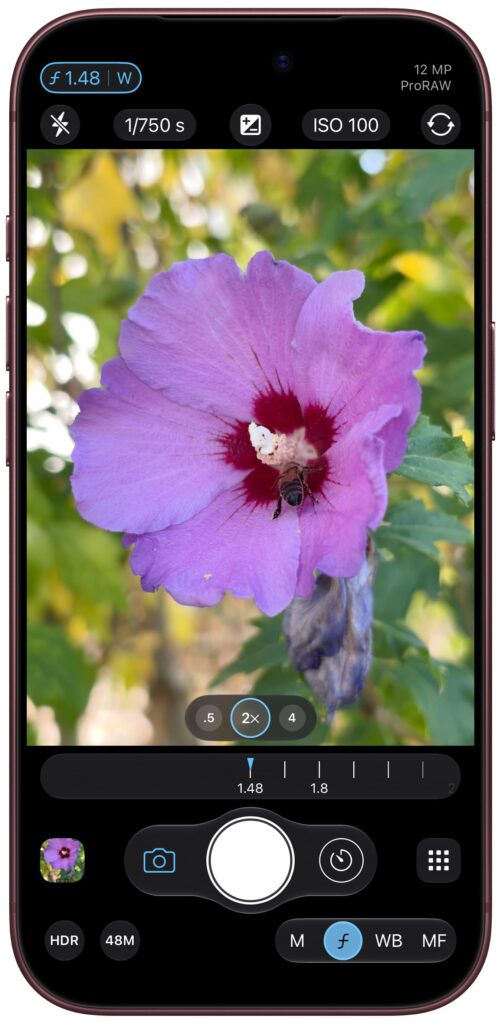
On iPhone 18 Pro and Pro Max, you’ll find a new ƒ button in the Manual Control Panel at the bottom right. Tap it to open the aperture dial and choose a value from ƒ/1.48 to ƒ/4. ProCamera also gives you intermediate settings, such as ƒ/1.6 and ƒ/2.0, so you can fine-tune the balance between light, depth of field, and sharpness beyond the four main aperture values. Additionally, a new ƒ-stop display in the top-left corner also shows which lens is currently active: Ultra Wide (U), Wide (W), or Tele (T).
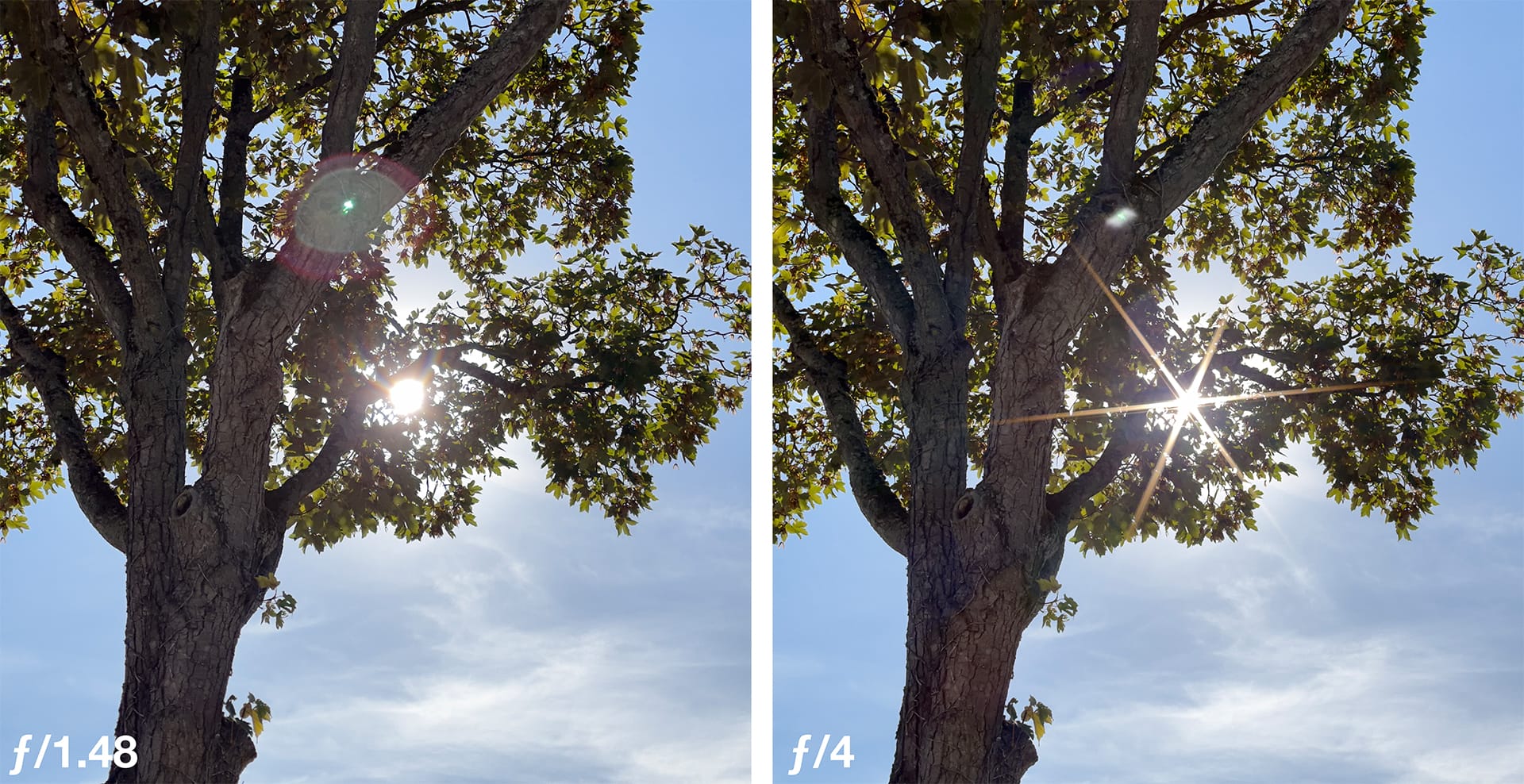
ƒ/1.48: Let the light in. At its widest opening, the main camera lets in approximately 45% more light than the iPhone 17 Pro’s ƒ/1.78 lens at the same exposure time. You can use that extra light for a faster shutter speed to capture movement or a lower ISO (= less image noise). It also gives you the strongest optical background blur available on the main camera. The trade-off is some softness toward the edges, a common characteristic of lenses at wide apertures. Bright light sources in or near the frame can also create more noticeable flare.
ƒ/1.8: A versatile everyday setting. Very close to the fixed aperture of the previous generation, ƒ/1.8 offers a useful balance between light gathering and sharpness. It’s a good starting point for everyday photography when you don’t need the widest opening or extra depth of field. There is a reason this was used on previous iPhones…
ƒ/2.8: Bring out the extra detail. Early tests point to ƒ/2.8 as the sweet spot for maximum sharpness and detail, making it a great choice for landscapes, architecture, and scenes where a little more depth of field is welcome. It’s best used in bright light, where you can keep ISO low and shutter speeds fast despite the smaller opening.
ƒ/4: Explore depth and light stars. The smallest opening gives you the greatest depth of field available on the main camera and can turn bright light sources (the sun, LED panels,…) into distinctive sun stars also know as starburst effect. Try it with sunlight peeking through leaves or reflections on water. Their appearance changes with aperture, so compare ƒ/4 with ƒ/1.8 and ƒ/2.8 to find the look you prefer. Stopping down this far can slightly soften fine detail through diffraction, making ƒ/4 a creative choice rather than the automatic setting for maximum sharpness.
More Creative Control and More to Come!
Physical aperture and Portrait mode offer different possibilities: The new aperture dial controls the physical opening inside the main camera’s lens, changing how much light reaches the sensor and how depth of field is rendered optically. The simulated aperture in Portrait mode uses depth information and software to blur the background. This can create much stronger subject separation and smoother-looking blur, including in portraits where the optical effect would be subtle. Both have their place: one shapes the image during capture, while the other lets you adjust the blur computationally.
This is just the beginning for ProCamera. With v27.0, the new ƒ-stop dial puts the hardware to work right away. As we continue exploring the possibilities of the new hardware and software, we’ll keep refining the experience and developing further enhancements.
The iPhone has never offered this level of photographic control and we’re excited to help you make the most of it, whether you’re taking a quick photo or carefully setting up your next capture.
As always, if you have any questions, suggestions, or encounter a bug, please reach out to us via in-app support or email at [email protected].
PS If you’d like to support our development, please help spread the word and consider leaving a positive review in the App Store -> http://procamera-app.com/review
Thank you!